• About
    • Cut N Make Crafts Privacy & Disclosure Policy
    • Disclaimer
  • JOIN THE SVG SUPERSTAR WAIT LIST

Jav Sid

SVG Business Coach

  • Home
  • SVG Business Podcast
    • Ep: 1 Why Sell SVG Cut Files
    • Ep 2: From a full-time nurse to an SVG designer – Farren Celeste
    • Ep 3: 400+ Sales in 4 months – Find out the secret to Emma’s success
    • Ep 4: No. 1 Thing You Need to Succeed in SVG Business
  • Designing SVGs
    • 3 COSTLY SVG Mistakes to Avoid – Cricut Crafts
    • 5 Epic Reasons to Create Your Own SVGs
  • Free SVG Files
  • Cricut
    • FREE Beginner’s Cricut Course
    • Cricut Tips
      • Vinyl Tips
        • MUST-HAVE The Ultimate Life-Saver Vinyl Guide for Beginners
        • Different Types of Vinyl and How to Use Them
        • How to use heat transfer vinyl for Cricut
        • How to Keep Iron-on Transfers from Peeling
        • 5 Terrible Iron-on/HTV Mistakes to Avoid – Tips for Iron-on Transfers
        • How to Layer Vinyl in Cricut Design Space
        • 9 UNIQUE Heat Transfer Vinyl Projects to Try
      • Cricut Design Space Help
      • 9 Must-Have Everyday Objects for Cricut Owners
      • Convert Picture to SVG – 3 Quick and Easy Methods
      • Cricut Print and Cut Basics for Beginners + FAQs
      • A Complete Guide to Cricut Blades for Beginners
      • 30+ Cricut Tips for Beginners for the Best Cut
      • Ultimate Beginner’s Guide to Cricut Tools
      • Ultimate Guide to Cricut Mats for Beginners
      • Lesson 1: Cricut Introduction and Set-Up
      • A Beginner’s Guide to Design Space
    • Cricut Crafts for Beginners
      • Birthday Crafts
        • DIY Hand-lettered Cake Topper (Cricut)
      • Cricut Flowers
        • EASY Giant Paper Gerbera Daisy Template FREE SVG
        • DIY Rose Paper Flower Bouquet – FREE SVG for Cricut
        • EASY Crepe Paper Sunflower FREE SVG+TEMPLATE
      • Cricut Felt Projects
        • Cute Felt Frog Craft [Template+SVG Free]
        • Cute DIY Felt Pencil Toppers [FREE SVG]
        • Cute DIY Felt Cloud Wall Hanging [FREE SVG]
      • Cricut Kids Crafts
        • Paper Popsicle Craft [FREE SVG + PDF]
        • Super-Cute Turtle Paper Craft for Kids [FREE SVG+PDF]
        • Paper Plate Fox Cricut Craft for Kids [FREE SVG]
        • Must-Have Supplies for Cricut Beginners
        • How to Write with Cricut: Ultimate Guide
        • FREE Graduation Card SVG File + Intricate Cut Tips + Tutorial
      • Cricut Vinyl Projects
        • 4th of July Mason Jars with Patriotic SVG (FREE)
        • DIY Vinyl Mug Cricut Gift for Teachers
        • How to Make a Custom Tea Towel with Cricut
        • Cricut Mason Jar Labels DIY – FREE SVG
        • DIY Car Ornament-Cricut Maker Wood Project
        • How to Layer Vinyl in Cricut Design Space
      • Fall Crafts
      • Graduation Crafts
      • Home Decor
        • DIY Welcome Tile with Cricut [FREE SVG]
      • Mother’s Day Crafts
        • Free Mother’s Day SVG – Gift Box Tutorial
      • Unicorn Crafts
        • DIY Unicorn Bookmark Using Cricut
        • DIY Unicorn Hair Clips – FREE SVG
        • DIY Unicorn Paper Clips – Beginner Cricut Project
        • How to Make a Unicorn Birthday Banner – FREE SVG
      • Wedding Crafts
        • FREE Wedding Card SVG File + Tutorial
        • Wedding Themed Lantern FREE SVG
  • Cookie Policy (EU)

How to write the perfect Instagram caption each time

July 7, 2020 by Jav

Let’s all be super honest for a minute here. Captions matter just as much as good photos when it comes to Instagram. Though being visually appealing helps you build an audience, how you phrase your captions can take your brand from average to awesome.

It can be pretty difficult to come up with a good caption each time you post especially if you post a lot on Instagram. To help you figure out the perfect caption for each of your posts,  here are a few tips that will make a difference.
Table of Contents

  • Pay attention to grammar and the way you phrase things
  • 2. Come up with a few different drafts to explain your topic properly
  • 3. Include a CTA – [A MUST]
  • 4. Be funny but stay true to your voice
  • 5. Try to follow a unique theme or a  subject
  • Conclusion
  • About me
    • Don’t forget to save this post for later by clicking the save button below!

Pay attention to grammar and the way you phrase things

When it comes to writing anything on the internet, you need to be 100% sure that your content is grammar free. 

Even though captions are often quite small, they still need to be grammatically correct. You need to write your sentences so they make sense to your audience. Your goal is to get your message across as clearly as possible to inspire your audience to take an action. 

2. Come up with a few different drafts to explain your topic properly

Even though the limit of words in the caption on an Instagram post is quite big, you might have noticed the words are hidden after a certain limit.

Not everyone who sees your post will click on that “more” tab to see the entire caption. That’s why it’s important to explain the most important parts first. Your first sentence must be killer enough to immediately grab your audience’s attention. You can write down a couple of different captions before choosing one that you like the most.

3. Include a CTA – [A MUST]

Call-to-action (CTA) is when you prompt your audience to interact with your post or take any other action.

CTA can include:

  • liking or commenting on the post
  • visiting the link in bio or
  • contacting via DM

If you want to boost your audience engagement, CTA is a great way to achieve that. Carry out small surveys or ask questions in your captions so people interact with your posts. Captions can be a great way to include a CTA in your story on Instagram.

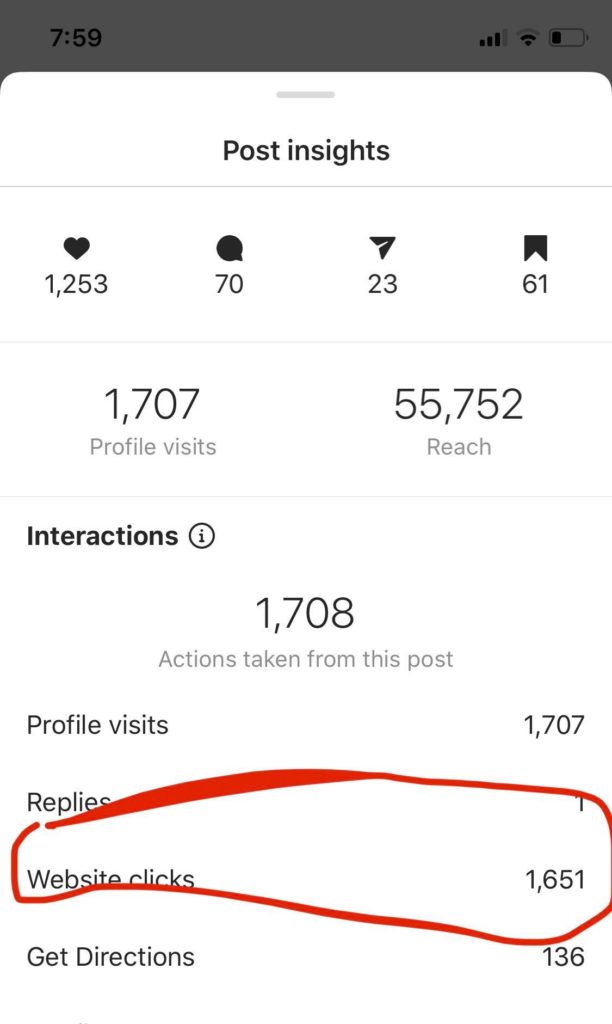
Most of my monthly income comes from using the right CTA in posts. Here’s one of my recent giveaway announcement post. By simply writing “Enter via the link in bio” I got 1600 page visits within 24 hours. 

On other posts, CTAs have brought me around US$1,000 in a DAY! So, yep, CTAs do work!
View this post on Instagram

🎉NEW GIVEAWAY 🎉 ENTER VIA LINK IN BIO….. . . . . #cricutprojectsuccess #cricutmadecrafts #cricutmadegift #cricutmakercrafts #cricutmademedoit #cricutproject #cricutmaker #cricut #cricutmade #designisinthedetails #cricutexploreair2 #svgcuttingfiles #svgfiles #svg #svgdesigns #cricutprojectsuccess #cricutteacher #cricutmachine #cricutcrafting #cricuteasypress #cricutcraft #cricutdesignspace

A post shared by Cricut Crafts by Jav (@cricutmakercrafts) on Jul 4, 2020 at 2:38pm PDT

4. Be funny but stay true to your voice

Captions often are expected to be funny so people reading them find it interesting. That doesn’t mean you have to compromise on your quality.

It might take a while to find the perfect balance of funny and serious content in a caption. You need to be informal but at the same time, get what you want to say across to the audience. That’s why it’s okay to take some time to figure out a well-balanced caption.

5. Try to follow a unique theme or a  subject

Coming up with good captions can be done easily if you focus on one single topic as multiple topics often make captions lengthy and boring to readers.

Following a specific type of aesthetic or a theme enables you to write a perfect caption. Your captions should also be able to uniquely identify your brand or your business in general.


Conclusion

Captions can make or break your business and they need to be good in order to showcase your brand and your image perfectly to your audience. Using these tips suggested above, hopefully, you’ll be able to write better captions from now on.

It will take a lot of time and practice to perfect the craft of writing interesting captions. I hope that this little guide helps you out in that process of learning. Just be you and you will automatically become a pro at writing catchy captions!

About me

Hi, I’m Jav! I created the @cricutmakercrafts Instagram account back in January 2019 with absolutely zero idea that in just over a year I would gain 100k followers. Thanks to my Instagram I’m currently earning 5k per month from my new blog in just a year. Instagram is one of my biggest traffic source and list builder. To learn more about making money from Instagram, be sure to join my Instagram list below.

Don’t forget to save this post for later by clicking the save button below!
Related Posts:

  • Ep 2: From a full-time nurse to an SVG designer - Farren Celeste
    Ep 2: From a full-time nurse to an SVG designer - Farren…
  • How to Write with Cricut: Ultimate Guide
    How to Write with Cricut: Ultimate Guide
  • 5 Things you need to know as a newbie on Instagram in 2020
    5 Things you need to know as a newbie on Instagram in 2020
  • How to Improve Instagram Story Engagement in 2020
    How to Improve Instagram Story Engagement in 2020

Filed Under: Instagram tips

Previous Post: « FREE Plush Totoro Template + Tutorial + SVG
Next Post: How to use heat transfer vinyl for Cricut »

Primary Sidebar

Recent Posts

  • Get Free SVGs – Creative Fabrica
  • Mother’s Day Sublimation Designs for T-shirts
  • DIY Penguin Mug Holiday Decor
  • EASY Holiday Cake Topper Tutorial
  • Super Easy Felt Unicorn Ornament SVG + Tutorial

Amazon Affiliates Disclosure

Cut n Make Crafts is a participant in the Amazon Services LLC Associates Program, an affiliate advertising program designed to provide a means for sites to earn advertising fees by advertising and linking to Amazon.com.

Footer

cutnmakecrafts

Jav - SVG Business Coach
🔥40+ Cricut Gifts & Business workshops for $39 🔥40+ Cricut Gifts & Business workshops for $39 for a limited time!

Learn to make projects like

🌟𝐃𝐈𝐘 𝐇𝐨𝐥𝐢𝐝𝐚𝐲 𝐒𝐡𝐚𝐤𝐞𝐫 𝐏𝐡𝐨𝐭𝐨 𝐅𝐫𝐚𝐦𝐞

🔥𝐏𝐞𝐫𝐬𝐨𝐧𝐚𝐥𝐢𝐳𝐞𝐝 𝐖𝐨𝐨𝐝𝐞𝐧 𝐎𝐫𝐧𝐚𝐦𝐞𝐧𝐭𝐬

🌟𝐏𝐞𝐫𝐬𝐨𝐧𝐚𝐥𝐢𝐳𝐞𝐝 𝐖𝐨𝐨𝐝𝐞𝐧 𝐁𝐨𝐨𝐤𝐦𝐚𝐫𝐤𝐬 𝐟𝐨𝐫 𝐬𝐭𝐮𝐝𝐞𝐧𝐭𝐬

🔥𝐂𝐮𝐬𝐭𝐨𝐦 𝐩𝐚𝐩𝐞𝐫 𝐬𝐭𝐨𝐜𝐤𝐢𝐧𝐠 𝐠𝐢𝐟𝐭 𝐛𝐚𝐠𝐬 (𝐩𝐞𝐫𝐟𝐞𝐜𝐭 𝐟𝐨𝐫 𝐜𝐚𝐧𝐝𝐢𝐞𝐬)

🌟𝐒𝐡𝐚𝐤𝐞𝐫 𝐜𝐚𝐫𝐝 𝐟𝐨𝐫 𝐡𝐨𝐥𝐢𝐝𝐚𝐲𝐬

🔥𝐃𝐈𝐘 𝐏𝐫𝐢𝐧𝐠𝐥𝐞𝐬 𝐠𝐢𝐟𝐭 𝐛𝐨𝐱 𝐟𝐨𝐫 𝐡𝐨𝐥𝐢𝐝𝐚𝐲

All these and MORE (40+ total) available for just $39 for a limited time. 💎💎💎 𝐆𝐞𝐭 𝐢𝐭 𝐧𝐨𝐰 𝐯𝐢𝐚 𝐭𝐡𝐢𝐬 𝐥𝐢𝐧𝐤 https://craftysummits.com/gbc-bf/ 𝐨𝐫 𝐭𝐡𝐞 𝐥𝐢𝐧𝐤 𝐢𝐧 𝐛𝐢𝐨! 

Make gorgeous personalized gifts and MONEY with your Cricut this holiday season with the Gifts & Business w/Cricut Pass 💎💎💎�𝐞𝐭 𝐢𝐭 𝐧𝐨𝐰 𝐯𝐢𝐚 𝐭𝐡𝐢𝐬 𝐥𝐢𝐧𝐤 https://craftysummits.com/gbc-bf/ 𝐨𝐫 𝐭𝐡𝐞 𝐥𝐢𝐧𝐤 𝐢𝐧 𝐛𝐢𝐨!
🌟$𝟭𝟱𝟬𝟬 𝗳𝗿𝗼𝗺 𝗢𝗡𝗘 𝗦𝗩𝗚 𝗯𝘂𝗻𝗱𝗹𝗲 𝗶𝗻 𝗢𝗡𝗘 𝗱𝗮𝘆!

🔥𝟲𝟬𝟬+ 𝘀𝗮𝗹𝗲𝘀 𝗮𝗻𝗱 𝟯 𝗦𝗩𝗚 𝘀𝘁𝗼𝗿𝗲𝘀 𝗶𝗻 𝟭𝟬 𝗺𝗼𝗻𝘁𝗵𝘀.

🌟𝟭𝟴 𝘀𝗮𝗹𝗲𝘀 𝘄𝗶𝘁𝗵𝗶𝗻 𝟭𝟰 𝗱𝗮𝘆𝘀 𝗼𝗳 𝗹𝗮𝘂𝗻𝗰𝗵𝗶𝗻𝗴 𝗮 𝗻𝗲𝘄 𝗦𝗩𝗚 𝘀𝘁𝗼𝗿𝗲.

🔥𝗙𝗿𝗼𝗻𝘁 𝗽𝗮𝗴𝗲 𝗳𝗲𝗮𝘁𝘂𝗿𝗲 𝗼𝗻 𝗮 𝗕𝗜𝗚 𝗦𝗩𝗚 𝘄𝗲𝗯𝘀𝗶𝘁𝗲 𝘄𝗶𝘁𝗵𝗶𝗻 𝟭 𝗺𝗼𝗻𝘁𝗵 𝗼𝗳 𝗼𝗽𝗲𝗻𝗶𝗻𝗴 𝗮 𝗻𝗲𝘄 𝗦𝗩𝗚 𝘀𝘁𝗼𝗿𝗲.

These are REAL results my students have seen when working with me inside my coaching program SVG Superstar.

🎉You CAN make $$$ from SVGs.

✅You just need to create money-making SVG cut files that people want to buy.

🔥Learn to design & sell SVGs that crafters really want to buy inside my program SVG Superstar.

💎Enroll now for $200 (x10).

🎁𝐃𝐌 𝐒𝐕𝐆𝐒 𝐟𝐨𝐫 𝐝𝐞𝐭𝐚𝐢𝐥𝐬.

#cricutcrafts #svgs #cricutsvgs #svgdesigner #svgcutfiles #designsvgs
🔥FREE 3-day event just for Cricut card makers 🔥FREE 3-day event just for Cricut card makers

Learn to make 30+ holiday cards and get FREE SVGs including this one.

Get your free ticket here: https://cricutcardsummit.com/?affiliate=javsid
🌟$𝟭𝟱𝟬𝟬 𝗳𝗿𝗼𝗺 𝗢𝗡𝗘 𝗦𝗩𝗚 𝗯𝘂𝗻𝗱𝗹𝗲 𝗶𝗻 𝗢𝗡𝗘 𝗱𝗮𝘆!

🔥𝟲𝟬𝟬+ 𝘀𝗮𝗹𝗲𝘀 𝗮𝗻𝗱 𝟯 𝗦𝗩𝗚 𝘀𝘁𝗼𝗿𝗲𝘀 𝗶𝗻 𝟭𝟬 𝗺𝗼𝗻𝘁𝗵𝘀.

🌟𝟭𝟴 𝘀𝗮𝗹𝗲𝘀 𝘄𝗶𝘁𝗵𝗶𝗻 𝟭𝟰 𝗱𝗮𝘆𝘀 𝗼𝗳 𝗹𝗮𝘂𝗻𝗰𝗵𝗶𝗻𝗴 𝗮 𝗻𝗲𝘄 𝗦𝗩𝗚 𝘀𝘁𝗼𝗿𝗲.

🔥𝗙𝗿𝗼𝗻𝘁 𝗽𝗮𝗴𝗲 𝗳𝗲𝗮𝘁𝘂𝗿𝗲 𝗼𝗻 𝗮 𝗕𝗜𝗚 𝗦𝗩𝗚 𝘄𝗲𝗯𝘀𝗶𝘁𝗲 𝘄𝗶𝘁𝗵𝗶𝗻 𝟭 𝗺𝗼𝗻𝘁𝗵 𝗼𝗳 𝗼𝗽𝗲𝗻𝗶𝗻𝗴 𝗮 𝗻𝗲𝘄 𝗦𝗩𝗚 𝘀𝘁𝗼𝗿𝗲.

These are REAL results my students have seen when working with me inside my coaching program SVG Superstar.

🎉You CAN make $$$ from SVGs.

✅You just need to create money-making SVG cut files that people want to buy.

🔥Learn to design & sell SVGs that crafters really want to buy inside my program SVG Superstar.

💎Enroll now for $200 (x10).

🎁𝐃𝐌 𝐒𝐕𝐆𝐒 𝐟𝐨𝐫 𝐝𝐞𝐭𝐚𝐢𝐥𝐬.

#cricutcrafts #svgs #cricutsvgs #svgdesigner #svgcutfiles #designsvgs
Load More... Follow on Instagram

Hi, friend! I’m Jav, a research assistant/SVG design coach. I’m here to help you design and sell SVG cut files. Check out my SVG Business Podcast if you want to start your own SVG business!


Cut N Make Crafts Privacy Policy

ARCHIVES

Copyright © 2026 · Sprinkle Pro theme by Restored 316